We have all stood at a bus stop, staring down the road, not sure if the bus just left or is still five stops away. DoubleHuat’s bus tools take away the guessing. Everything runs inside your phone’s web browser – there is nothing to download from the app store, no sign-up, and no annoying pop-up ads getting in your way when you are rushing.
Here are the three things most people use it for.
1. Check live bus arrival times
Open the bus arrival page and you have two easy ways to start.
Tap “Use My Location” and it finds the bus stops nearest to you, listed by how far away they are – for example, Blk 11 just 151m away, Blk 25 at 205m. Or type in the bus stop number: every bus stop in Singapore has a 5-digit code printed on the pole, so just key it in and tap Go.
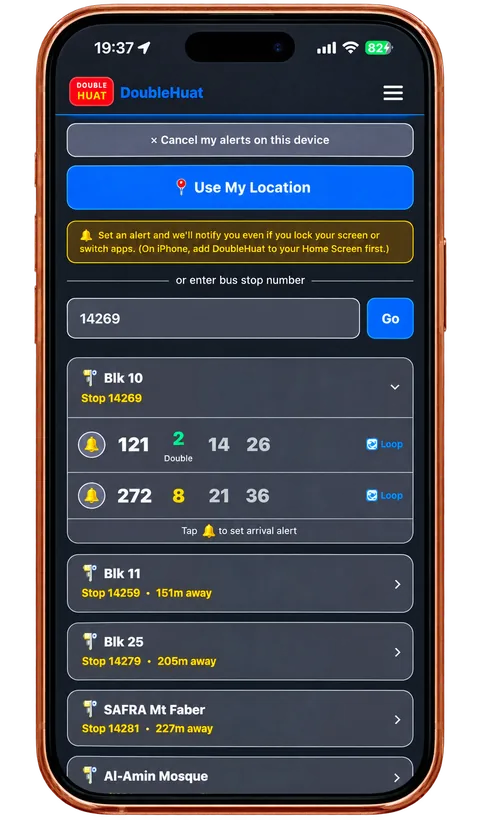
You then see the next few buses for that stop and how many minutes away each one is. A timing shown in green means the bus is almost here (about two minutes), so you know whether to walk over now or sit a little longer. It even tells you when a bus is a double-decker (the taller two-storey bus) or a loop service. The timings come from the Land Transport Authority (LTA) – the government body that runs Singapore’s public transport – using its live bus data, so they are the same numbers the bus operators use.
2. Set an alert so you never miss your bus
This is the part people love. Instead of refreshing the screen every 30 seconds, just tap the little bell icon next to your bus. DoubleHuat will then send your phone a notification when it is time to head out – even if your screen is locked or you have switched to another app.
So you can reply to a message, watch a video, or finish your kopi in peace. When your bus is close, your phone buzzes. No more last-minute sprinting to the stop, and no more standing there watching an empty road.
One tip for iPhone users: add DoubleHuat to your Home Screen first (steps are near the bottom) so the alerts can reach you properly.
3. Plan a trip and share your journey on WhatsApp
Need to get somewhere new? Open the journey planner and enter where you want to go. DoubleHuat maps out the route for you – which bus to take, where to walk, and the live bus timings along the way – so you are not fumbling with directions on the road.
Once you have picked a route, tap “Share this journey”. Your phone’s share menu opens and you can send the trip straight to someone on WhatsApp (or Telegram, or a text message). If the share menu is not available, the link is copied for you to paste anywhere.
It is handy for telling a friend exactly how to reach you, sending a parent the way home, or guiding a visitor who does not know the area – they get a clear link instead of a confusing voice explanation.
Add DoubleHuat to your Home Screen (just like a real app)
You do not install DoubleHuat from the App Store or Play Store. Instead you save the page to your Home Screen once, and after that it opens with a single tap – just like a normal app, but without taking up storage space on your phone. On iPhone this step also makes the bus alerts work properly.
On iPhone (using Safari):
- Open the DoubleHuat page in Safari.
- Tap the Share button (the square with an arrow pointing up) at the bottom of the screen.
- Scroll down and tap Add to Home Screen.
- Tap Add at the top right.
- Look for the DoubleHuat icon on your Home Screen.
On Android (using Chrome):
- Open the page in Chrome.
- Tap the three-dot menu at the top right.
- Tap Add to Home screen (it may also say Install app).
- Tap Add, and the icon appears on your Home Screen.
Why use DoubleHuat for bus timings?
- No download, no clutter – it runs in your browser and saves to your Home Screen in seconds.
- Clean and quick – no pop-up ads getting in the way when you are in a hurry.
- Alerts that actually reach you – get notified even with your screen locked.
- Free to use – for everyone, whether you are heading to school, work, or out with friends.
Frequently asked questions
Do I need to download an app?
No. DoubleHuat works in your phone’s web browser. You can add it to your Home Screen for one-tap access, but there is nothing to install from the App Store or Play Store.
Where do I find my bus stop number?
It is the 5-digit code printed on the bus stop pole or signboard. You can also just tap “Use My Location” and let DoubleHuat find your stop for you.
Will the alert still work if my phone is locked?
Yes. Once you set an alert, DoubleHuat can notify you even when your screen is off or you are using another app. On iPhone, add DoubleHuat to your Home Screen first so the alerts come through.
How do I share my journey?
Plan your trip in the journey planner, then tap “Share this journey”. Your phone’s share menu opens so you can send it on WhatsApp or copy the link to paste anywhere.
Is it free?
Yes, the bus arrival and journey tools are free to use.
Give it a try the next time you are heading out. Check your bus arrival times now, set one alert, and you will wonder how you ever waited at bus stops without it.